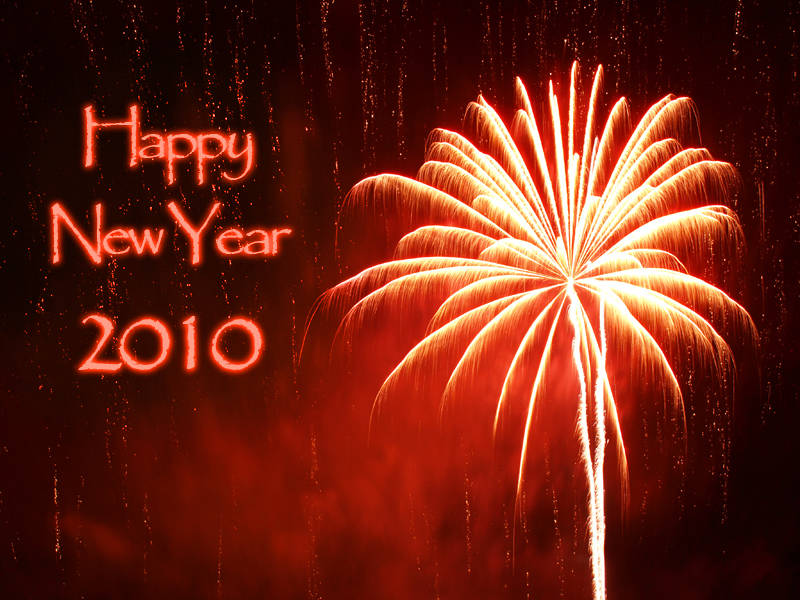
Happy New Year 2010. This is Benz World’s first creation of the decade. The redfirework was taken in the UK. I used Gaussian Blur on the lower text layer to make the glowing effect. Here are more fireworks from this display.
5 Responses to “New Year”
1
get free Photoshop Training:
Thanks for your blog, it is so good, I really like it! Its exactly what I was looking for when i searched for photoshop – I
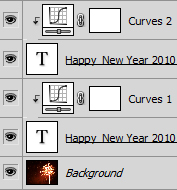
No problem. I used the text tool in photoshop to write the text. I then duplicated the layer and converted the lower layer to a bitmap by right clicking the layer and selecting rasterize type. You must do this before photoshop will let you add a blur. The curves layers in this image only affect the layer directly beneath, as shown by the bent arrow. I hope this helps.
January 16th, 2010 at 12:10 pm
5
matt nathanson music fan:
Hey, I just wanted to drop a note and say nice post!

Thanks for your blog, it is so good, I really like it! Its exactly what I was looking for when i searched for photoshop – I
I am very glad you like it.
Your article is very clear. Possibly will you please post some brand new information about this? take care
No problem. I used the text tool in photoshop to write the text. I then duplicated the layer and converted the lower layer to a bitmap by right clicking the layer and selecting rasterize type. You must do this before photoshop will let you add a blur. The curves layers in this image only affect the layer directly beneath, as shown by the bent arrow. I hope this helps.
Hey, I just wanted to drop a note and say nice post!